Beatled Controller
Source code lives in the main repo at controller/. (Historically a separate beatled-pico repository — that’s now a read-only mirror.)
Beatled Controller is embedded C firmware that drives WS2812 LED strips with beat-synchronized lighting patterns. It connects to the Beatled server over WiFi and receives tempo data and control commands via a binary UDP protocol.
The firmware runs on Raspberry Pi Pico W, ESP32, and as a native macOS/Linux application for development. A Hardware Abstraction Layer (HAL) with 10 modules allows the same application code to compile and run across all targets.
Supported Platforms
| Port | Target | Cores | RTOS | LED Driver |
|---|---|---|---|---|
pico | Raspberry Pi Pico W (RP2040) | 2 | Bare-metal | PIO + DMA |
pico_freertos | Raspberry Pi Pico W (RP2040) | 2 | FreeRTOS SMP | PIO + DMA |
posix | macOS / Linux | 1 | pthreads | Metal simulation |
posix_freertos | macOS / Linux | 1 | FreeRTOS (POSIX sim) | Metal simulation |
esp32 | ESP32-S3, ESP32-C3, etc. | 1-2 | FreeRTOS (ESP-IDF) | RMT peripheral |
Requirements
Pico W Hardware
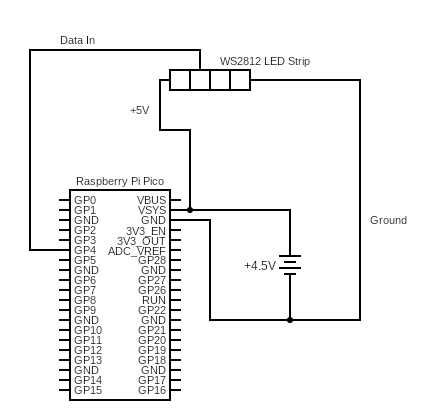
- Raspberry Pi Pico W
- AAA Battery holder (Adafruit)
- Wire (Adafruit)
- WS2812 LED Strip (Sparkfun)
- A hat or clothes to mount it on
ESP32 Hardware
- ESP32-S3 or ESP32-C3 dev board (e.g., ESP32-S3-DevKitC)
- WS2812 LED Strip
- USB cable for flashing
Getting Started
Clone the main repo and initialise the controller’s vendored submodules (includes the Pico SDK and FreeRTOS kernel):
git clone https://github.com/oost/beatled.git
cd beatled
git submodule update --init --recursive
All firmware sources are at controller/. ./beatled.sh defaults PICO_DIR to that path; override it only if you’re working on a parallel firmware tree.
Building for Pico W (UF2)
This cross-compiles the firmware into a .uf2 binary that you flash directly onto the Pico W.
Dependencies
brew install cmake
brew install --cask gcc-arm-embedded   # ARM cross-compiler
brew install openocd                    # on-chip debugger (optional)
brew install minicom                    # serial monitor (optional)
(Full Pico SDK setup instructions)
Build
Copy the template and fill in your values:
cp .env.wifi.template .env.wifi
cp .env.pico.template .env.pico
# edit .env.wifi with your WIFI_SSID, WIFI_PASSWORD (shared with the Pi host)
# edit .env.pico with BEATLED_SERVER_NAME, NUM_PIXELS, WS2812_PIN
WiFi networks live in the shared .env.wifi (one source of truth for the firmware builds and the Pi host’s wifi-fallback service). To roam between locations, add up to three upstream fallback networks via WIFI_SSID_2/WIFI_PASSWORD_2 … _4, and optionally the Pi’s own fallback hotspot via HOTSPOT_SSID/HOTSPOT_PASSWORD (joined last — it’s what the Pi broadcasts when no upstream WiFi is reachable). At boot the controller tries each non-empty network in order; if a network is unreachable it falls through to the next, and once the list is exhausted it cycles back to the first and keeps retrying until one joins.
Then configure and build (the build wrapper sources .env.wifi before .env.pico; do the same by hand if you build directly):
export PICO_TOOLCHAIN_PATH="/Applications/ArmGNUToolchain/12.2.rel1/arm-none-eabi"
# `set -a` exports every var so CMake picks them up from the environment
# ($ENV{WIFI_SSID} etc.) — a plain `source` would set but not export them,
# baking in empty WiFi credentials.
set -a
source .env.wifi   # WIFI_SSID/WIFI_PASSWORD (+ _2..4 fallbacks, HOTSPOT_*)
source .env.pico   # BEATLED_SERVER_NAME, NUM_PIXELS, WS2812_PIN
set +a

cmake -B build-pico \
  -DPORT=pico \
  -DPICO_BOARD=pico_w \
  -DPICO_SDK_PATH=lib/pico-sdk \
  -DNUM_PIXELS=$NUM_PIXELS \
  -DWS2812_PIN=$WS2812_PIN

cmake --build build-pico
The output binary is at build-pico/src/pico_w_beatled.uf2.
For the FreeRTOS variant (uses FreeRTOS SMP instead of bare-metal multicore):
cmake -B build-pico-freertos \
  -DPORT=pico_freertos \
  -DPICO_BOARD=pico_w \
  -DPICO_SDK_PATH=lib/pico-sdk \
  -DNUM_PIXELS=$NUM_PIXELS \
  -DWS2812_PIN=$WS2812_PIN

cmake --build build-pico-freertos
Flashing
Hold the BOOTSEL button on the Pico W while plugging it in via USB. It mounts as a USB drive. Copy the UF2 file onto it:
cp build-pico/src/pico_w_beatled.uf2 /Volumes/RPI-RP2/
The Pico reboots automatically and starts running the firmware.
Serial Monitor
To view logs over USB serial:
minicom -b 115200 -D /dev/tty.usbmodem*
Building for ESP32
The ESP32 port uses a separate ESP-IDF project wrapper in the esp32/ directory. It supports both dual-core chips (ESP32, ESP32-S3) and single-core chips (ESP32-C3).
Dependencies
Install ESP-IDF v5.x or later:
mkdir -p ~/esp
cd ~/esp
git clone --recursive https://github.com/espressif/esp-idf.git
cd esp-idf
./install.sh esp32s3    # or esp32, esp32c3
. ./export.sh
Build
Copy the template and fill in your values:
cp .env.wifi.template .env.wifi
cp .env.esp32.template .env.esp32
# edit .env.wifi with WIFI_SSID, WIFI_PASSWORD (shared with the Pico build + Pi host)
# edit .env.esp32 with BEATLED_SERVER_NAME, ESP32_TARGET, ESP32_PORT, NUM_PIXELS, WS2812_PIN
Fallback networks work the same as on the Pico: set WIFI_SSID_2/ WIFI_PASSWORD_2 … _4 to have the controller try each in order and keep cycling until one connects.
Then build and flash using the project script from the beatled repo:
./beatled.sh controller esp32-freertos flash
Or manually:
cd esp32
# `set -a` exports every var so idf.py / CMake read them from the
# environment ($ENV{WIFI_SSID} etc.), including the _2..4 fallbacks and
# HOTSPOT_SSID/HOTSPOT_PASSWORD.
set -a
source ../.env.wifi
source ../.env.esp32
set +a

idf.py set-target $ESP32_TARGET
idf.py build flash monitor -p $ESP32_PORT
Flash & Monitor
# macOS
idf.py flash monitor -p /dev/cu.usbmodem101

# Linux
idf.py flash monitor -p /dev/ttyUSB0
Dual-Core vs Single-Core
On dual-core chips (ESP32, S3), the LED task is pinned to core 1 while networking runs on core 0, matching the Pico W architecture. On single-core chips (C3), both tasks share the single core via FreeRTOS preemptive scheduling.
Building the POSIX Port (macOS)
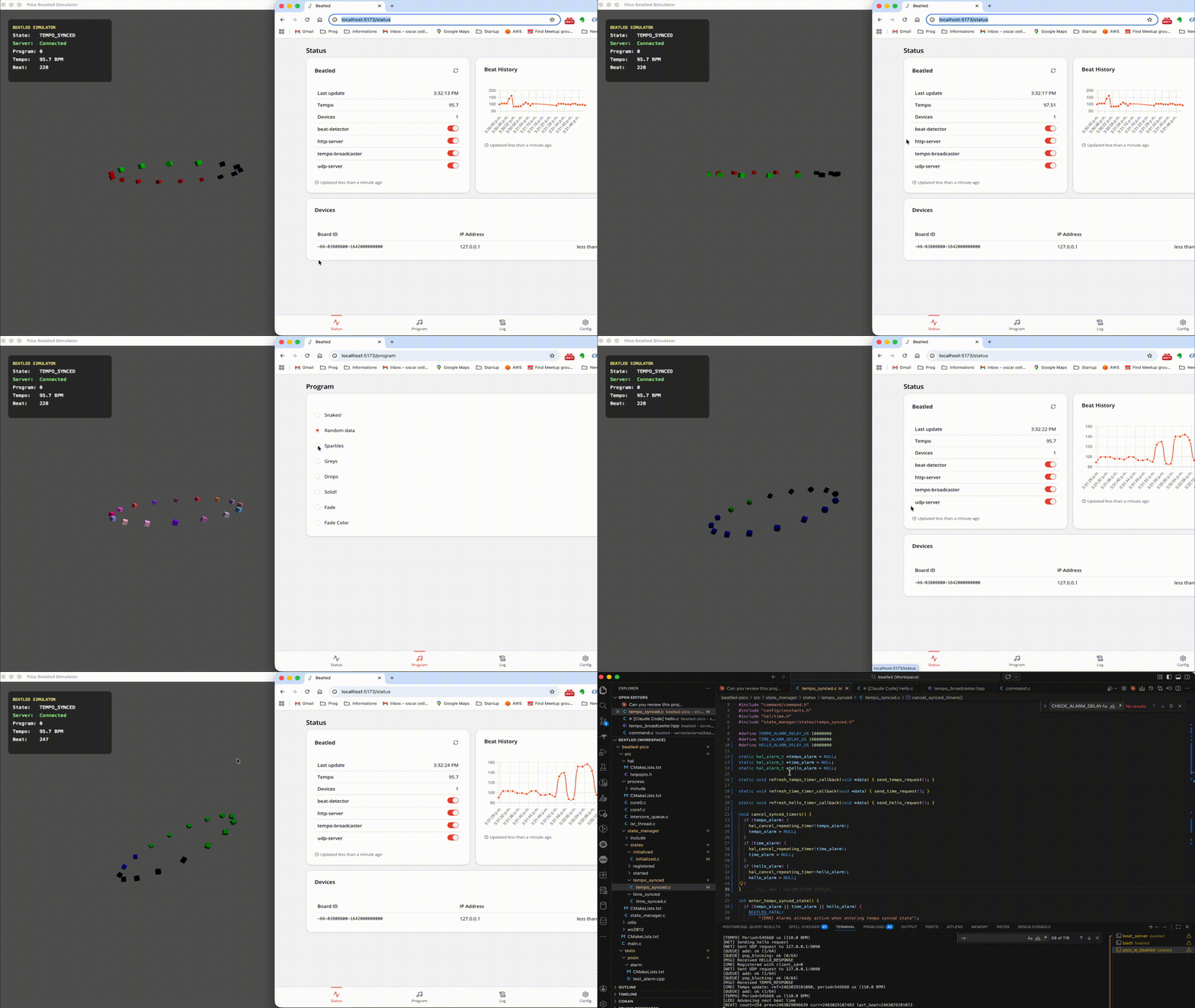
The POSIX port builds a native macOS executable that replaces hardware APIs with POSIX equivalents (pthreads, UDP sockets) and renders a 3D LED ring simulation using Metal shaders.
Dependencies
brew install cmake
vcpkg must be installed and VCPKG_ROOT set in your environment.
Build
Copy the template and fill in your values:
cp .env.pico.template .env.pico
# edit .env.pico — BEATLED_SERVER_NAME defaults to localhost if unset
source .env.pico
Then build:
cmake -B build \
  -DPORT=posix \
  -DCMAKE_TOOLCHAIN_FILE="$VCPKG_ROOT/scripts/buildsystems/vcpkg.cmake" \
  -DCMAKE_BUILD_TYPE=Debug \
  -DNUM_PIXELS=$NUM_PIXELS \
  -DWS2812_PIN=$WS2812_PIN

cmake --build build
For the FreeRTOS variant (runs a FreeRTOS POSIX simulator to validate RTOS-specific code paths):
cmake -B build_posix_freertos \
  -DPORT=posix_freertos \
  -DCMAKE_TOOLCHAIN_FILE="$VCPKG_ROOT/scripts/buildsystems/vcpkg.cmake" \
  -DCMAKE_BUILD_TYPE=Debug \
  -DNUM_PIXELS=$NUM_PIXELS \
  -DWS2812_PIN=$WS2812_PIN

cmake --build build_posix_freertos
Run
./build/src/pico_w_beatled.app/Contents/MacOS/pico_w_beatled
Or using the project utility script from the beatled repo (reads .env.pico automatically):
./beatled.sh controller posix build       # posix port
./beatled.sh controller freertos-sim build # posix_freertos port
By default, the POSIX port connects to localhost. Set BEATLED_SERVER_NAME in .env.pico to override.
Running Tests
cmake --build build
./build/tests/posix/integration/test_integration
./build/tests/posix/command/test_command
./build/tests/posix/clock/test_clock
./build/tests/posix/queue/test_queue
Debugging in VS Code
The project ships with a ready-to-use VS Code debug configuration for the POSIX port.
- Open the
controller/folder in VS Code (or open thebeatledrepo root and point the CMake extension atcontroller/CMakeLists.txt) Make sure
.vscode/settings.jsonhas the POSIX port selected (this is the default):"cmake.configureSettings": { "PORT": "posix", "CMAKE_TOOLCHAIN_FILE": "$env{VCPKG_ROOT}/scripts/buildsystems/vcpkg.cmake" }- Configure and build via the CMake extension (or the terminal commands above)
- Set
pico_w_beatledas the CMake launch target (CMake: Set Launch Target) Press F5 or select the (lldb) Launch configuration
This launches the POSIX executable under LLDB with full source-level debugging – breakpoints, variable inspection, and stepping all work as expected.
Device State Machine
Each controller follows this state machine to establish synchronization with the server:
stateDiagram-v2
    [*] --> STARTED
    STARTED --> INITIALIZED: Board init complete
    INITIALIZED --> REGISTERED: Hello response received
    REGISTERED --> TIME_SYNCED: Time sync complete
    TIME_SYNCED --> TEMPO_SYNCED: Tempo/NextBeat received
    TEMPO_SYNCED --> TEMPO_SYNCED: Re-sync (new tempo data)
| State | Description |
|---|---|
| STARTED | Initial state after power-on |
| INITIALIZED | WiFi connected, peripherals ready |
| REGISTERED | Server acknowledged device (assigned client_id) |
| TIME_SYNCED | NTP-style clock offset established |
| TEMPO_SYNCED | Receiving beat data, LEDs active |
See Server ↔ Controller Communication for the full message exchange sequence.
Dual-Core Architecture
On dual-core targets (Pico W, ESP32-S3), the firmware splits work across two cores to keep LED timing deterministic. On single-core targets (ESP32-C3) and the POSIX port, the same tasks run concurrently via FreeRTOS scheduling or pthreads.
graph LR
    subgraph Core0["Core 0 - Network"]
        EL[Event Loop] --> CMD[Command Handler]
        CMD --> SM[State Manager]
        UDP[UDP Listener] --> EQ[Event Queue]
        EQ --> EL
    end

    subgraph IPC["Inter-core"]
        ICQ[Intercore Queue]
    end

    subgraph Core1["Core 1 - LEDs"]
        LP[LED Processor] --> WS[WS2812 Driver]
        REG[Registry<br/>Shared State] --> LP
    end

    CMD -->|tempo, program updates| ICQ
    ICQ --> LP
    CMD -->|mutex-protected| REG
LED Patterns
The firmware ships with 8 built-in patterns:
| ID | Name | Description |
|---|---|---|
| 0 | Snakes | Animated snake trails along the strip |
| 1 | Random | Random pixel colors |
| 2 | Sparkles | Twinkling sparkle effect |
| 3 | Greys | Greyscale gradient |
| 4 | Drops | Raindrop-style pulses |
| 5 | Solid | Solid brightness driven by beat fraction |
| 6 | Fade | Grey fade synced to beat |
| 7 | Fade Color | Color fade synced to beat |
Patterns are simple C functions that receive the beat position (0-255) and beat count. New patterns can be added in src/ws2812/programs/.
Hardware Abstraction Layer
The firmware uses a 10-module HAL so that application code (state machine, commands, clock, patterns) is completely platform-independent. Each module has a public header in src/hal/<module>/include/hal/ and port-specific implementations under src/hal/<module>/ports/<port_name>/.
Compile Definitions
Each port sets one or more of these defines for conditional compilation:
| Port | PICO_PORT | POSIX_PORT | ESP32_PORT | FREERTOS_PORT |
|---|---|---|---|---|
pico | x | |||
pico_freertos | x | x | ||
posix | x | |||
posix_freertos | x | x | ||
esp32 | x | x |
HAL Modules
| Module | Purpose | Key API |
|---|---|---|
| blink | Status LED | blink(speed, count) |
| board | Board init + unique ID | get_unique_board_id(id) |
| network | UDP communication | start_udp(), send_udp_request(), get_ip_address() |
| process | Multi-core / threading | start_core1(fn), sleep_ms(ms) |
| queue | Thread-safe message queues | hal_queue_init(), hal_queue_add_message(), hal_queue_pop_message() |
| registry | Shared state with mutex | registry_lock_mutex(), registry_unlock_mutex() |
| runtime | Application startup | startup(main_fn) |
| time | Microsecond clock + alarms | time_us_64(), hal_add_repeating_timer() |
| wifi | WiFi management | hal_wifi_init(), wifi_check(ssid, password) |
| ws2812 | LED strip driver | ws2812_init(), output_strings_dma(pixels) |
Implementation Per Port
| Module | pico | pico_freertos | posix | posix_freertos | esp32 |
|---|---|---|---|---|---|
| process | Pico multicore | FreeRTOS tasks | pthreads | FreeRTOS tasks | FreeRTOS xTaskCreatePinnedToCore |
| queue | Pico queue_t | FreeRTOS xQueue | circular buffer + mutex | = pico_freertos | = pico_freertos |
| registry | Pico mutex | FreeRTOS mutex | POSIX mutex | = pico_freertos | = pico_freertos |
| network | lwIP raw API | = pico | BSD sockets + pthreads | BSD sockets + FreeRTOS task | BSD sockets + FreeRTOS task |
| time | HW alarm pool | = pico | POSIX timers | FreeRTOS software timers | esp_timer + FreeRTOS timers |
| wifi | CYW43 driver | = pico | stub | stub | esp_wifi event API |
| ws2812 | PIO + DMA | = pico | Metal renderer | = posix | RMT led_strip |
| runtime | bare-metal init | FreeRTOS scheduler | Metal app delegate | FreeRTOS scheduler | NVS init + app_main |
= pico / = posix / = pico_freertos means the port reuses the same source files.
Code Sharing
Three FreeRTOS ports (pico_freertos, posix_freertos, esp32) share the same queue and registry implementations because FreeRTOS queues and mutexes have no hardware dependencies. The POSIX DNS resolver (getaddrinfo) is shared by posix, posix_freertos, and esp32 since ESP-IDF’s lwIP supports it. FreeRTOS software timer alarms are shared between posix_freertos and esp32.
Wiring Diagram